Hello, Today we are going to remind ourselves how we can trace a function so that we can know where it was called from. If you have not ever messed up while trying to find where a function was called from you can't understand how important this post is, but if you have messed up and struggled to know and find where exactly the function is called from and then here is the solution
<template>
<NuxtLayout>
    <main class="flex justify-center">
        <section class="max-w-xl">
        </section>
    </main>
</NuxtLayout>
</template>

<script setup lang="ts">

const route = useRoute()
const { data } = await useAsyncData(`blog/${route.path}`, () => queryContent(route.path).findOne())

useHead({
    title: data.value.title,
    meta:[
        {
            hid: 'description',
            name: 'description',
            content: data.value.description,
          }
    ]
})

onMounted(() => {
    console.log(data.value)
    console.log(route.path)
})

</script>
So we already know some debugging functions in javascript like console.log()
but there is time they never help to such situation, that's when you find that the real thing to use is
console.trace()
So here is the step by step of doing the things. I am using CodePen for writing these simple codes. Let us suppose we have two functions add and consoleAdd
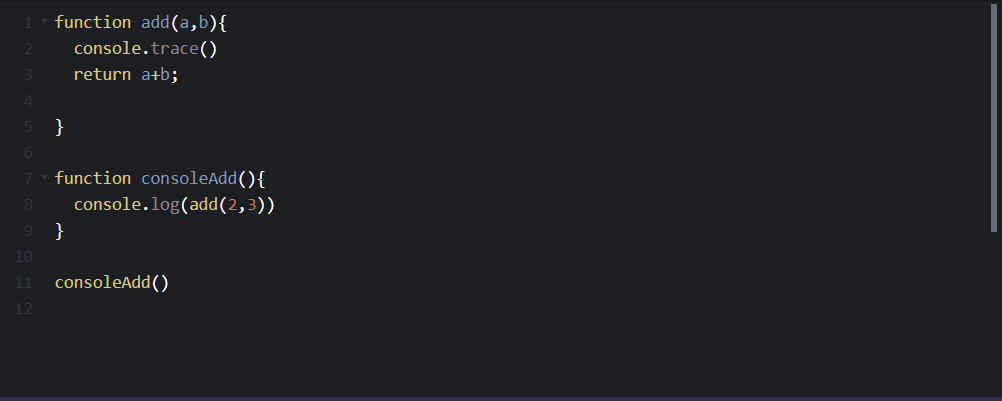
And I think you have noticed that in add() function we have something called console.trace() so at this time we want to ensure and know where exactly add() function was called from.
So to know this we will go in console in browser dev tools, as where every console functions are found, so what you will see is the list of where the function is going called and there parents function
but the exact function will be the first one as you see right here
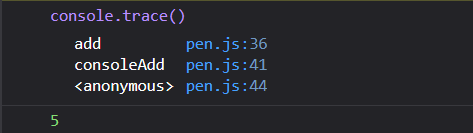
It thinks you already see that we have add in the first place so that's where our console.trace() was called from , but remember our aim is not knowing where console.trace() was called from but where add() was called from
simple console.trace() shows every function call from where console.trace() is called to the last one
I think you can see it clear in the above image that
console.trace()was called inadd()add()was called fromconsoleAdd()- And finally
consoleAdd()was called byanonymousas it was called by browser while running the code.
Simply those number on the end of the name of a function are the number of the line where the function is returned or if the function did not return anything they take the next line to the last function curry brace
}
That 5 you saw, is the output of add(2,3).I hope this post help, Thank you dev community
| Key | Type | Description |
|---|---|---|
| 1 | Wonderful | Table |
| 2 | Wonderful | Data |
| 3 | Wonderful | Website |